bomtastic
7An SBOM built from /proc, not from the build: every binary and shared library a live process has mapped, who owns it, and which of it has a published fix that isn't installed.
Runs on any Linux host with yeet installed
on the hub machine
$ npx -y github:yeet-src/bomtasticcopyon each other machine
$ yeet service apply -f gh:yeet-src/bomtasticcopy!Needs yeet 0.25+; the hub also needs Node 20+. The hub opens on localhost:3100; the analyst tab needs yeet login.
bomtastic
An SBOM built from
/proc, not from the build. Every binary and shared library mapped by a live process on the host, who owns it, what it's listening on, and which of it has a published fix that isn't installed — read straight from the kernel, on the box, right now.




bomtastic turns a host's process table into a runtime bill of materials — one page listing every binary and .so a live process has in memory, which package owns it, its hash, the sockets it holds, the container it's in, and the security advisories that apply to exactly the packages in use. A force-directed graph shows the whole dependency picture; a symbol search asks the ELF tables whether the function an advisory names is really loaded; an AI analyst reads the same data and can trace what a process does now. Point one hub at a fleet and the same page covers every machine.
Tip
No agent to install, no inventory to ship. The scan runs inside a yeet isolate on the host — a sandbox with no network, no filesystem and no
exec— and asks the kernel throughyeet.graph.query. The only host-side code beyond reading/procis three named Node functions (package lookup, hashing, advisory feeds), and you can read all of them before lunch.
Install
Linux only, yeet 0.25+. The daemon runs as root; nothing below needs
sudo. Manual install guide
On the hub machine
The one box that serves the pages. Needs Node 20+:
curl -fsSL https://yeet.cx | sh
npx -y github:yeet-src/bomtastic     # http://localhost:3100
That fetches the release pack, applies it as the bomtastic service
(the scanner isolate behind a gateway on :3450) and serves the pages
from the same pack. Add --peer <host>:3450 once per other machine to
put it on the fleet page.
On each other machine
No Node needed, only the scanner:
curl -fsSL https://yeet.cx | sh
yeet service apply -f gh:yeet-src/bomtastic
Run either line again to move to a newer release; apply rolls the
change out in place. yeet login signs a host in to yeet.cx for the
analyst tab; skip it and everything else still works.
Package ownership comes from rpm or dpkg, whichever the host has;
advisories from dnf updateinfo on the RPM family and from
OSV elsewhere.
| page | what |
|---|---|
/ | the inventory: findings, advisories, functions named by advisories, binaries, libraries, sockets, containers, the analyst |
/graph | the dependency graph — by package or by library, hover to trace, click for the list |
/proc/<pid> | one process: binary, package, hash, cwd, cgroup, sockets, every mapped library |
/fleet | every machine the hub can reach, one row each, with a read-only copy of its findings |
GET /api/sbom | the inventory as CycloneDX 1.5 JSON, with purls, hashes and a vulnerabilities array |
POST /api/scan | run a scan (from cron or CI) and get back the diff against the previous one |
A 30-second primer on runtime BOMs
A build-time SBOM describes the artifact. It reads a lockfile or a container image and lists what could be loaded. It has never met the machine.
The kernel keeps the receipts. For every live pid, /proc/<pid>/exe is the binary, /proc/<pid>/maps is every file mmap'd into it (.so or otherwise, including ones deleted from disk since), /proc/<pid>/fd joined to /proc/net/tcp by inode is its sockets, /proc/<pid>/cgroup is its container. That is the whole BOM, and it is what this tool reads.
Mapped, not installed. "openssl is installed" is a package-manager fact. "SSL_select_next_proto is in memory in 17 processes and the fix is published" is the finding a human can act on. The gap between the two is what a runtime BOM is for.
Common use cases
- "Are we running the vulnerable version anywhere?" — the list of processes that map the affected library, with the advisory id next to them, on every host in the fleet.
- A patch that did not take effect. A library upgraded on disk while the old copy is still mapped shows up as
(deleted)inmaps; the finding names the process to restart. - What no package owns. The agent someone installed by hand, the runtime under
~/.pyenv, thenodebinary a CI installer dropped under/opt— invisible torpm -qascanners, listed here with the ports they hold. - Drift since the last scan. Processes started and exited, binaries appeared, hashes changed, listeners and outbound peers added, advisories fixed or new — every scan is diffed against the one before.
- An auditor wants a file.
GET /api/sbomis CycloneDX with vulnerabilities, generated from what is running rather than from what was shipped.
What you're looking at
The inventory page, top to bottom:
| section | meaning |
|---|---|
| Fleet strip | node count, how many are red, the worst node named (hub only) |
| Since last scan | the one-line diff against the previous saved scan, with the processes that came and went |
| Counts | processes, binaries, libraries, unpackaged, listening, advisories, containers, high findings |
| Findings | deterministic, evidence-first: stale mapped copies, executables in /tmp, unowned binaries, root listeners on every interface, listeners with no visible owner, who the host talks to |
| Security advisories | published fixes not installed, for exactly the packages a running process maps; each CVE with its CVSS score and the pids running the package |
| Who has this function? | every function a pending advisory names in its text, checked against the ELF symbol tables of everything in memory — plus a search box for any function name or regex |
| Binaries / Libraries | one row per distinct file: package, hash, and the processes using it |
| Listening / Outbound / Containers | sockets attributed to their process by inode; containers with their host-side processes |
| Analyst | a yeet:ai conversation with tools over the inventory and two live BPF tracers |
Every finding names the pids that produced it, and each pid links to its process page. The model ranks and explains findings; it does not invent them.
The dependency graph
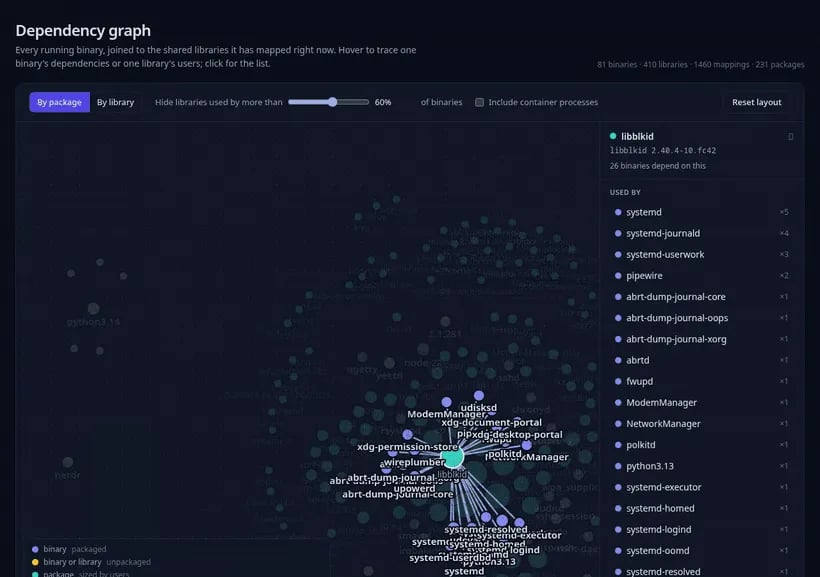
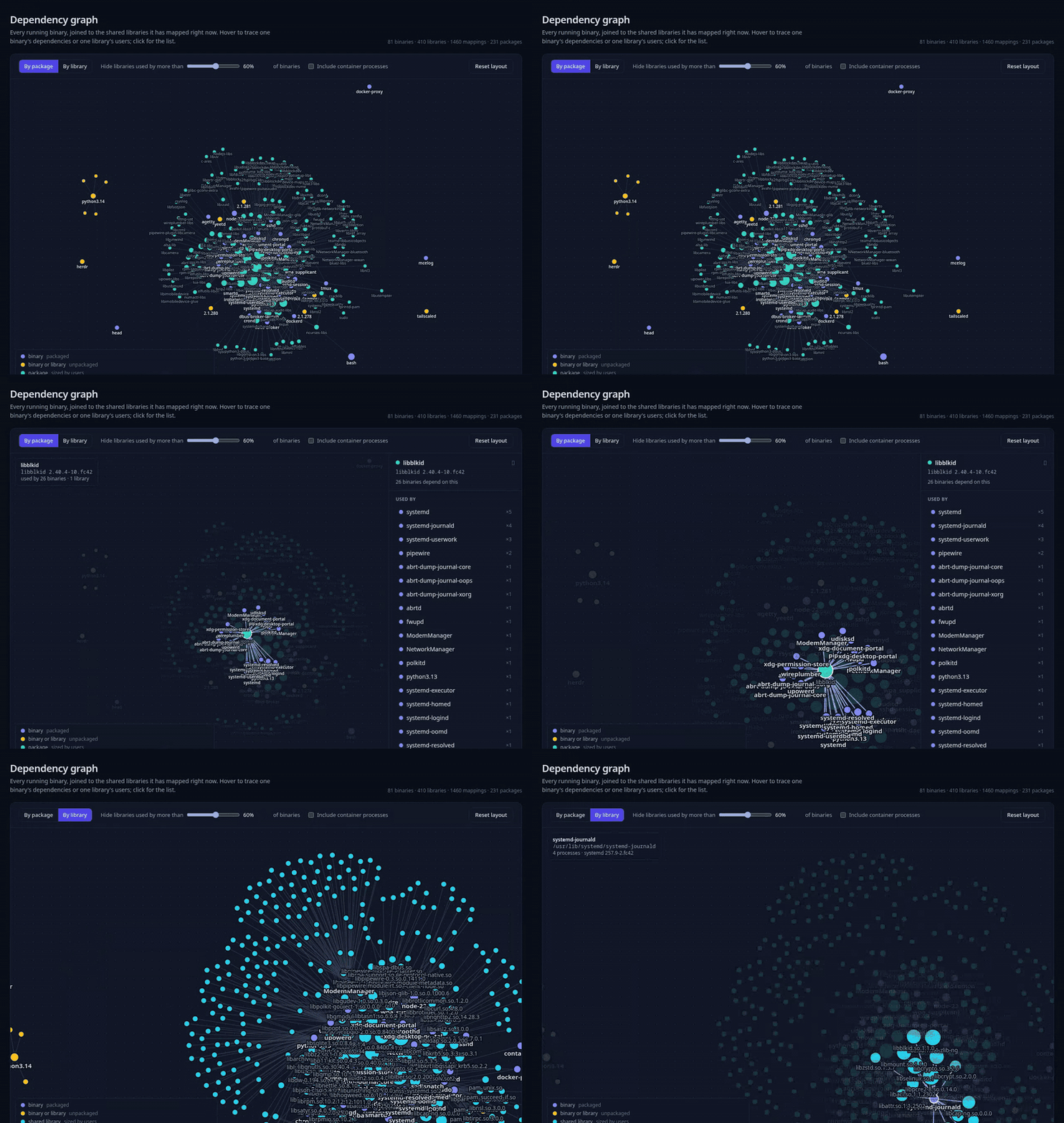
/graph joins every running binary to the shared libraries it maps, as one force-directed picture. By package folds libraries into their owning package (unpackaged and container files stay as files); by library shows every .so. The slider hides the ubiquitous libraries — libc, ld-linux — that would otherwise connect everything to everything. Hover a node to trace one binary's dependencies or one library's users; click for the list, with how many processes each user runs. The isolate shapes the data (app/lib/graph-data.js); a "use client" island (app/lib/DependencyGraph.jsx, d3-force) does layout and interaction in the browser, where hover and zoom belong.
How it works
Three runtimes, each doing the part only it can. The scan is one shared thing: every tab sees the same inventory, and a rescan from any tab refreshes all of them.
app/lib/walk.js            the /proc walk: processes, maps, fds, sockets, cgroups, docker via yeet.graph.query
app/lib/scan-worker.js     runs the walk in a Worker (a second isolate) and posts the result back in chunks
app/lib/inventory.js       the shared scan: walk → enrich → advisories → findings → diff; one signal every page reads
app/lib/enrich.js          "use server": package ownership from one rpm/dpkg dump, SHA-256 of every binary
app/lib/advisories.js      "use server": dnf updateinfo or OSV, CVE detail and CVSS from OSV, cached
app/lib/symbols.js         "use yeet": yeet:sym Inspector over every mapped file — advisory functions, and search
app/lib/analyst.js         "use yeet": the yeet:ai tool loop, streamed to the page as it generates
app/lib/trace.js           "use yeet": exec and TCP-connect tracepoints, attached only while a trace runs
app/lib/fleet.js           "use server": walks the hub gateway's manifest and calls latest() on every node
bpf/*.bpf.c                the two tracepoint programs, linked into bin/app.bpf.o by make
service.toml               the yeet service: the isolate and its gateway
bin/bomtastic.mjs          the launcher: fetch the pack, apply it, mount peers, serve the pages
The kernel side
The walk is one GraphQL query per question against sys_graph, yeet's schema over /proc:
const { data } = await yeet.graph.query(`{
  procs { pid exe cmdline maps { kind path } fds { inode kind } cgroups { pathname } }
  tcp { inode local_address { addr } remote_address { addr } }
}`);
Every maps entry whose path ends in .so-something is an edge from the binary to the library, and it's the kernel saying so. The walk runs in a Worker so the page's isolate never blocks; the result comes back as string chunks because a message is capped at 124 KiB (and a string doubles in size once any non-Latin-1 character is in it — one emoji in one process's argv is enough).
Two BPF programs cover the questions /proc cannot answer — what a process does now:
| program | hook | what it captures |
|---|---|---|
exec.bpf.c | tracepoint/sched/sched_process_exec | every successful execve, with pid, parent and path |
connect.bpf.c | tracepoint/sock/inet_sock_set_state | every outbound TCP connect, attributed to the connecting pid |
They are attached only for the seconds a trace lasts, when the analyst (or you) asks.
The symbol side
An advisory usually names the function in its own text. app/lib/symbols.js pulls those names out of every pending advisory and opens every binary and library a host process maps with yeet:sym's Inspector — about 12 ms per distro library, 1,500 symbols — to say whether the function is defined in something that is in memory, and in which processes. A hit in a package other than the advisory's is kept but marked, since a common name like chmod matches libc.
Why the isolate cannot leak
The yeet isolate has no fetch, no filesystem and no exec; its globals are graph, bpf, sym, ai, alert and a short list of friends. You are reading every process's memory map as root, and the runtime doing it has no way to send any of that anywhere. What needs the host — rpm, dpkg, sha256, the advisory feeds — is three "use server" functions in Node, named in one file. That split is the security story: not "we audited it", but it can't.
Fleet: many machines, one page
Every machine runs the same service; what differs is who dials whom.
browser ──▶ yeetkit hub (Node) ──▶ gateway :3450 ──/app──▶ isolate          machine A (hub)
                                        └──/nodes/<B>──▶ gateway :3450 ──/app──▶ isolate   machine B
yeet service apply -f gh:yeet-src/bomtastic                                   # on every machine
npx -y github:yeet-src/bomtastic --peer 10.0.0.2:3450 --peer 10.0.0.3:3450   # on the one you look at
A peer is a proxy route on the hub's gateway, /nodes/<host> with the
dots as dashes, which the launcher mounts for each --peer; by hand it
is yeet service mount bomtastic/gateway -L /nodes/10-0-0-2 -U ws://10.0.0.2:3450/.
The hub's gateway has one proxy route per peer and publishes /.well-known/yeet/manifest.json, which re-roots each peer's routes under /nodes/<host>. /fleet walks that manifest, dials each /app and makes the same latest() call the hub makes to its own isolate — two gateway hops, about half a second. Rows land as each node answers; a dead node turns unreachable after 20 s without holding the others, and one whose upstream is down is still listed, from yeet service export. Adding a machine is the apply line there and one more --peer here.
The launcher takes --port for the pages, --service-port for the gateway, --release for another pack (a URL or a local .tar.gz) and --no-pages to apply and mount only; it sets BOM_GATEWAY, BOM_NODE_PORT and BOM_SERVICE for the hub to match.
Building from source
git clone https://github.com/yeet-src/bomtastic && cd bomtastic
npm install                       # Node 20+; pulls yeetkit from GitHub
npm run dev                       # the pages at :3100, with reload, spawning their own isolate
npm run build                     # bundle the scan worker, compile bpf/*.bpf.c, build isolate + node + browser bundles into dist/
services/deploy.sh [peer:3450 ...]   # your build as the service: `yeet service apply -f service.toml`, plus a mount per peer
npm start -- --isolate ws://127.0.0.1:3450/app   # the pages against it
make pack                         # bomtastic.tar.gz, what a release carries
node bin/bomtastic.mjs --release ./bomtastic.tar.gz   # the hub install, against your own pack
make bpf                          # just the BPF object, bin/app.bpf.o
service.toml is the service: the isolate dist/server.js, lazy, and
a gateway on :3450 serving its tty at /app. The daemon copies the
code in at apply, so a rebuild is live once apply runs again. make
uses the pinned static toolchain resolved by build/toolchain.mk
(clang, bpftool, veristat), fetched once into a per-machine cache; no
system C or BPF toolchain is needed. The CO-RE header
bpf/include/vmlinux.h, bin/, dist/ and public/scan-worker.js
are build artifacts. A tag v* runs .github/workflows/release.yml,
which builds, packs and publishes bomtastic.tar.gz on the release.
Testing across kernels
make veristat loads bin/app.bpf.o with veristat on your kernel and reports whether every program passes, plus per-program complexity (needs sudo). .github/workflows/kernel-matrix.yml runs the same check across 6.1, 6.6, 6.12 and bpf-next in CI, booting each in a VM; make veristat-matrix runs that matrix locally on Linux + KVM.
Requirements
Important
Linux x86_64 or aarch64 with BTF (
CONFIG_DEBUG_INFO_BTF=y) — needed to generatevmlinux.hfor the tracepoint programs. Default on current Arch, Fedora, Ubuntu and Debian 12+. CO-RE means no per-kernel recompile.yeet 0.25.0 or newer (
Worker,yeet service apply,yeet:sym), Node 20+, andrpmordpkgfor package ownership — on any other package manager, files simply show as unpackaged.
Honest caveats
Note
bomtasticis inventory, not enforcement. It tells you what is running and what applies to it; it stops nothing.
- Container processes are inventoried, not enriched. Their paths resolve against another root, so package ownership, hashes and symbol search skip them; they appear with their container id.
- Advisory coverage is the feed's. dnf's
updateinfoon the RPM family, OSV elsewhere; a distro with neither shows no advisories rather than wrong ones. - Function names come from advisory text. A CVE that names no function has no row in the symbol list; a Python advisory's
get_datacan collide with an unrelated C symbol, which the list marks. - The tty is shared. Whoever dials a service's
/appsees every frame the isolate writes. Put the gateway on a private network until yeet routes carry auth. - The analyst needs a model. Without
yeet loginit reports that, and everything else works.
Community questions
Is this an agent? It's a yeet app: a JavaScript isolate the daemon runs, plus a small Node side for the package manager. The isolate cannot open a socket, so there is nothing to phone home with.
Does it replace my build-time SBOM?
No. Keep generating that; it describes the artifact. This describes the machine, and GET /api/sbom gives you the same CycloneDX shape so the two can sit side by side.
Why is a library listed as unpackaged? No package on the host claims that path. Usually a language runtime, a manual install, or something a CI installer dropped — which is exactly the kind of thing a package-based scanner misses.
What does a scan cost? The kernel side is a few hundred milliseconds in a Worker. Hashing binaries and asking the package manager take a few seconds on the Node side; advisories are cached.
License
Apache-2.0. The BPF programs declare char LICENSE[] SEC("license") = "GPL" in bpf/exec.bpf.c and bpf/connect.bpf.c, required for the kernel helpers they use.
Built with yeet, a JS runtime for writing eBPF programs and live system dashboards on Linux, and yeetkit for the pages. Join us on discord.